Drum Loop
A raw drum loop flipped with selective reverses on the kick and snare.
0:00 / 0:00
Audio sample coming soon.
Reverse reverb and effects for REAPER. Capture a sound, flip it, and let it build into the downbeat.
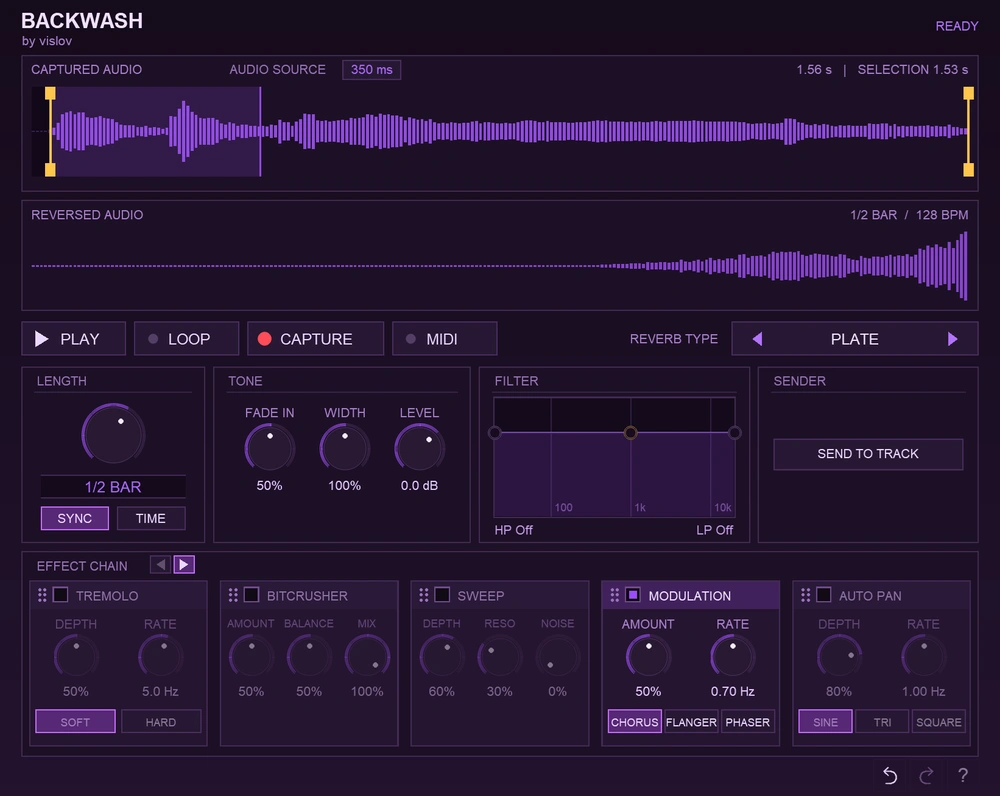
Click any part of the window
Press Capture, then play the audio on the track: recording starts with the sound. Drag the yellow markers to choose the part to reverse. Audio source sets how much sound after the start marker goes into the reverb. The mouse wheel zooms, Shift+wheel pans, Ctrl+click fits the whole capture.
The result you will hear: the reverb tail played backwards, so it swells up to the hit. The header shows its length against your project tempo.
Play previews the result and Loop repeats it. Capture records new audio. The arrows switch the reverb between Plate, Hall, Room, Chamber and Cathedral. A MIDI note triggers playback too.
How long the swell lasts. Sync mode locks it to tempo, from 1/16 bar to 2 bars. Time mode sets it freely from 50 to 6000 ms.
Shape sets how the swell builds: lower values arrive earlier, higher values later and sharper. Width narrows or widens the stereo image, with 100% as the original. Level is the output gain.
Drag the points on the graph: a high-pass from 20 Hz to 2 kHz, a low-pass from 500 Hz to 20 kHz, and a bell band in the middle for cutting or boosting the tail.
Send to Track sends the current result to a track in your REAPER project. The Lua receiver script is included in the package, you run it once.
Each effect has its own on/off box. Drag a card by its grip to change the order, and use the arrows or the mouse wheel to flip between pages.
The same sound without and with Backwash. Switch between them while it plays.
A raw drum loop flipped with selective reverses on the kick and snare.
Audio sample coming soon.
A short phrase with a reversed plate tail leading into the next line.
Audio sample coming soon.
A chord with Pitch Riser and Sweep on the reversed tail.
Audio sample coming soon.
Every effect is baked into the reversed tail. Switch on what you need and arrange the chain until it sounds right.
The tail starts up to 24 semitones below the original pitch and climbs. A curve control sets whether it climbs steadily or saves the climb for the end.
Soft, Tube, Hard clip or Fuzz, with drive and a dry/wet mix.
A low-pass filter that opens over the tail. Set the depth, the resonance and an optional noise layer.
Chorus, flanger or phaser, with amount and rate.
Soft pulses or hard on/off chopping, with depth and rate.
Movement between left and right as a sine, triangle or square wave.
Sample rate and bit reduction with a balance between them, and a mix.
Free. Download one file and drag it into REAPER.
One file with the plugin and the Send to Track script. No installer needed.
The Send to Track button works through a small Lua script running in REAPER. It is already installed with the package, you only need to run it once.
The GitHub repository and the PDF manual are separate downloads and do not depend on the REAPER package.